Domain Overview
Domain analysis tool: traffic, keywords and top pages for any website
Get a domain overview of any website: estimated organic traffic, ranking keywords, and top organic pages, with filters, export and saved keywords in the same place.
Size up any domain before you sign up
Three free tools from OpenSEO. No signup required.
Free website traffic checker
Estimated organic traffic, keyword count, and the top 5 keywords and pages for any domain. Compare two domains side by side.
Free competitor analysis
A competitor's top 20 keywords and top 10 pages, plus up to 20 keywords they rank for that you don't.
Free domain age checker
Registration date, expiry date and registrar for up to 10 domains at once.
Read a domain, find its keywords, go deeper
- 01
Analyze a domain
Enter a domain, a folder or a single page and pick a country. The overview shows estimated organic traffic and how many keywords the site ranks for, then lists its keywords and its top pages.
- 02
Find competitor keywords
Filter the keyword list by traffic, volume, CPC, difficulty or position, include or exclude words, and save the ones worth building or defending.
- 03
Take the list further
Export the keywords or pages to CSV, Excel or Google Sheets, or save keywords to your list for content planning and rank tracking.
Four numbers in every overview
- Organic traffic
- Visibility
- Organic keywords
- Topics
- Top keywords
- Rankings
- Top pages
- Organic reach
When to pull a domain overview
- Research a competitor before writing a content plan.
- Estimate a site's organic footprint.
- Find keyword gaps between your site and the domains already ranking.
Why do competitor research here
- Domain research connects directly to keyword, backlink, and rank tracking workflows.
- Built around ranking keywords, estimated traffic, and top pages for practical competitor research.
- Open-source and self-hostable for teams that want control over their SEO stack.
How much to trust a traffic estimate
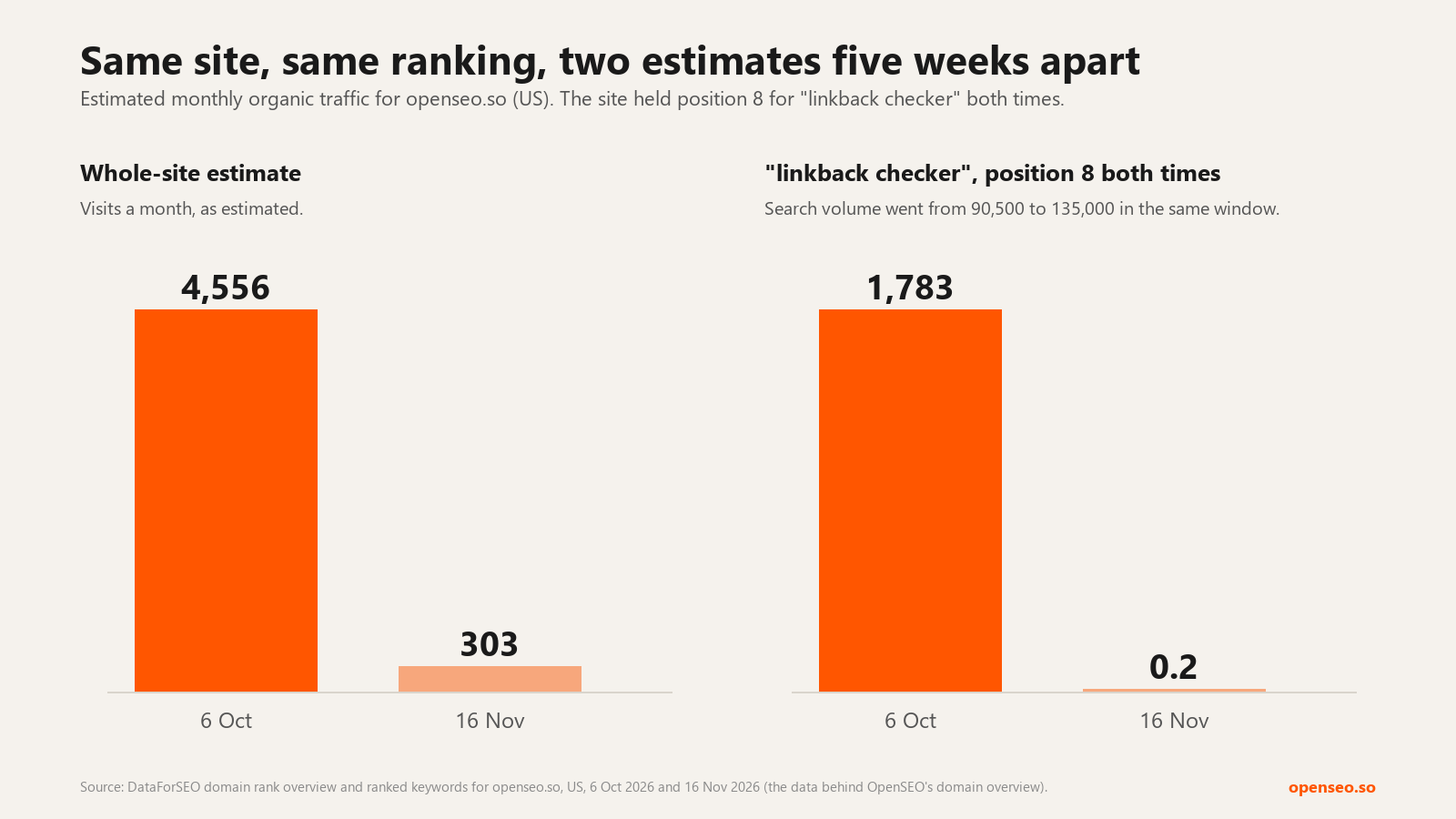
Estimated traffic is a model, not a count. It combines each keyword's search volume with an expected click rate for the position, and the data provider revises both. openseo.so is a live example. In October the model put it at 4,556 visits a month. Five weeks later it said 303. The site ranked 8th for "linkback checker" both times, and that one keyword's estimate fell from 1,783 visits to less than one. Read the keywords behind a total before you quote it, and compare domains on the same day.
Check a domain before you buy it, link to it or partner with it
Three questions settle most of it. How old is it? The domain age checker shows when it was registered and who the registrar is. Is its link profile clean? The spam score checker lists the spammiest domains linking to it. Does it earn real search traffic, and from what? The overview shows estimated traffic, the keywords behind it and the pages that rank. A domain that is old, clean and ranks for its own topic is a safer bet than one with a big traffic number built on a single keyword.
Competitor research from your AI agent
Connect OpenSEO to Claude, Cursor or ChatGPT over MCP and the agent can pull a domain's traffic estimate and the keywords it ranks for, filtered by position, volume or brand terms. The competitor analysis skill gives it an order of work: keywords, pages, backlinks and content themes, ending in what to learn from and where your site has a better angle.
The Competitive Analysis Strategy Library
Practitioner strategies for turning a domain overview into a decision. Each guide includes a full walkthrough and a copy-paste MCP prompt.
Find out who your real competitors are
Compare a keyword set and read the domains actually in your SERPs.
Keyword gap analysis: subtract the brand terms first
Strip brand from both sides and the gap becomes buildable.
How accurate are competitor traffic estimates?
Close-variant stacking, other business lines, and how to correct for both.
Read a competitor's link profile before you copy it
Referring domains, spam score, and the broken links worth chasing.
Where domain research goes next
Domain overview questions
What is a domain overview?
A domain overview is a snapshot of a website's organic search footprint: estimated organic traffic, how many keywords it ranks for, its top ranking keywords, and its top organic pages. It's usually the first step in competitor research because it shows where a site earns its visibility.
How does this compare to Semrush Domain Overview?
OpenSEO covers the core of the same report (estimated traffic, organic keywords, top keywords, and top pages) without a triple-digit monthly seat. OpenSEO is open source, so you can self-host it, and the managed app starts at $10/month with usage credits included.
Can OpenSEO help with competitor keyword analysis?
Yes. Enter a competitor's domain and you get the keywords it ranks for and its top organic pages: the raw material for finding topics worth building or defending.
Is Domain Overview the same as a traffic checker?
Not quite. It includes an estimated-traffic metric, but the value is seeing which keywords and pages produce that traffic, which a plain traffic checker doesn't show.
Can I analyze a folder or a single page?
Yes. Choose a domain, a domain with its subdomains, a folder or one page. The keyword and page lists follow that choice. The traffic and keyword totals at the top always cover the whole domain.
Does OpenSEO show domain authority?
Not under that name. Domain Authority is Moz's score. The backlinks report shows a domain rank next to referring domains and spam score, so you can see what the number is built from.
Try OpenSEO
The open source alternative to bloated, expensive, legacy SEO tools.
