Saved Keywords
Keyword list manager: save, tag and export the keywords worth acting on
Keep useful keyword ideas organized so they can inform content planning, rank tracking decisions, and AI-agent workflows.
Build the first draft of the list for free
A free tool from OpenSEO. No signup required.
Save it, tag it, use it again
- 01
Save promising keywords
Save ideas from keyword research, a competitor's domain overview or your Search Console queries, or paste in a list of your own.
- 02
Organize by topic
Tag keywords by page, campaign, content cluster, or priority, then filter the list by tag, volume, CPC, difficulty or the words a keyword contains.
- 03
Reuse saved keywords across workflows
Export the list to CSV or Google Sheets, or let an AI agent read and update it over MCP.
When the list earns its keep
- Tag keyword ideas into topic or page groups from keyword research.
- Prepare candidate keywords to add to rank tracking.
- Keep human and AI-agent research in the same workspace.
Why keep the list next to the research
- Saved keywords bridge research, tracking, and AI workflows.
- Saved keywords preserve available metrics like volume, CPC, difficulty, intent, and tags.
- Saving, tagging and exporting use no credits.
Tag by the page you'll build, not the intent label
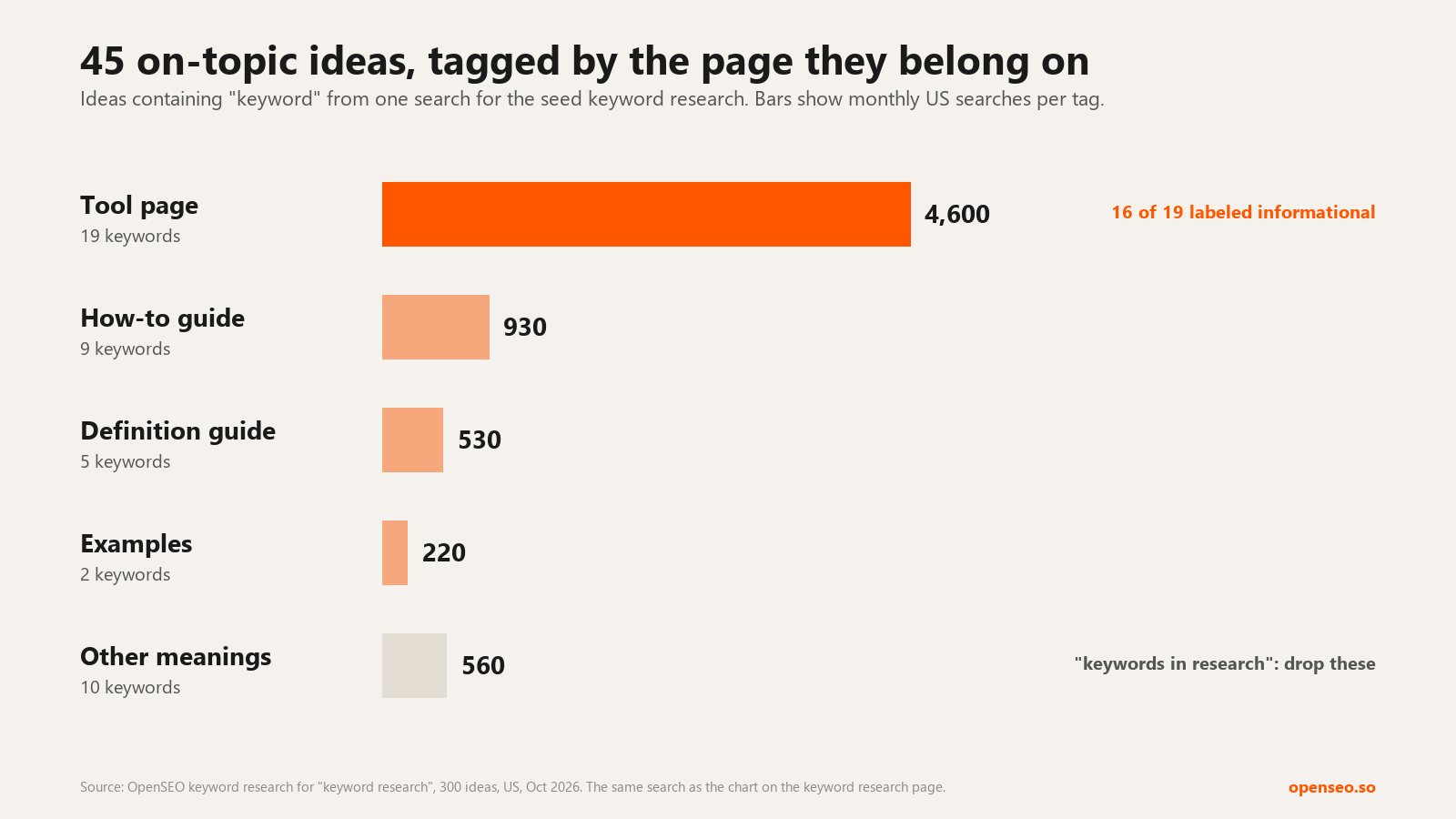
The keyword research page's example search for "keyword research" returned 300 ideas, and 45 of them contain the word "keyword". Tagged by the page each one belongs on, they make four pages and one pile to drop. 19 belong on a tool page, with 4,600 searches a month between them. Nine fit a how-to guide, five a definition page and two an examples page. The other ten use "keywords" in the academic sense, like "keywords in research". The intent column called 16 of the 19 tool-page keywords informational, including "free keyword research tool". Read the keyword, then tag it.
Bring in a list you already have
Paste up to 2,000 keywords at a time, one per line, or a CSV with keywords in the first column. Add a tag as you import, and choose whether to fetch volume, difficulty and CPC now. Fetching the numbers uses credits. Saving, tagging and exporting don't. Keywords are saved for the project's country and language, so the numbers match the market you're planning for.
Hand the list to a writer, a developer or an AI agent
Select keywords and export them to CSV or Google Sheets for a writer's brief or a client sheet. Your AI assistant can work with the same list over MCP: save keywords with their metrics and tags, read the list back filtered by tag, retag a group into page clusters, and remove what you no longer need. The list stays one source of truth whether a person or an agent did the research.
Where saved keywords go next
Saved keyword questions
Why save keywords in an SEO tool?
Saved keywords keep research organized so teams can return to the ideas that are worth writing, optimizing, or tracking.
Can saved keywords be used with rank tracking?
Yes. Saved keywords are a natural source for deciding which terms should be monitored over time.
How do saved keywords fit into SEO planning?
Research fills the list, tags group it into pages and campaigns, and the shortlist feeds rank tracking. Saved keywords are the bridge between finding an opportunity and acting on it.
Can I export saved keywords?
Yes. Select keywords in the list and export them to CSV or Google Sheets, or copy them.
Can I import a keyword list?
Yes. Paste up to 2,000 keywords at a time, or a CSV with keywords in the first column, and add a tag on the way in. Fetching volume, difficulty and CPC for them is optional and uses credits.
Can an AI assistant add keywords to my list?
Yes. Through the OpenSEO MCP server, an assistant can save up to 100 keywords at a time with their metrics and tags, read the list back, and remove keywords you no longer need. Saving uses no credits.
Try OpenSEO
The open source alternative to bloated, expensive, legacy SEO tools.
